Make training more engaging
More content doesn’t improve learning. Clear, focused sessions help people understand and apply what matters.
What makes training webinars effective
Designed to grow with your webinars
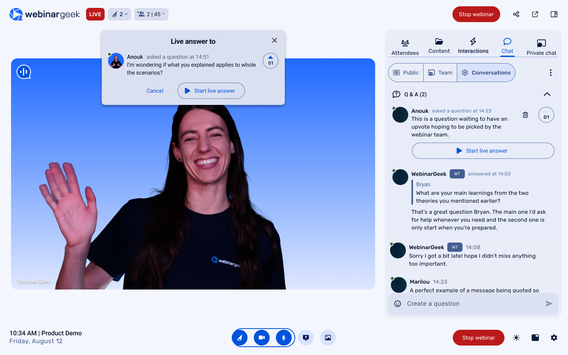
Customize your registration page to collect the details your team actually needs to qualify leads.
Once someone registers, WebinarGeek sends the confirmation, reminder, and follow-up emails from your webinar dashboard.
After the webinar, your statistics show who attended, how long they watched, and their completion ratio, so you know exactly who to follow up with.
Start free trial
Stay interactive, even on repeat
Not everyone can attend live. With an automated webinar, you can turn one session into a recurring broadcast that keeps generating leads.
Add polls, public chat, and an on-demand replay to keep viewers engaged. Your follow-ups can then be tailored based on viewer behavior.
Which means your webinar becomes a repeatable system for marketing or training, not a one-time event you rebuild every month.
Here’s how WebinarGeek compares
We’ve done the research. Now look at the details:

VS
Livestorm
Livestorm
Zoom
General options
Advanced options
Tool/interaction
Integration
Support
Last updated: 2026
The webinar software industry's top rated support
Consistently rated highly for usability and support, because when your webinar matters, reliability matters.


FAQ
Is WebinarGeek a good webinar platform for lead generation?
Yes. WebinarGeek includes customizable registration pages, custom fields to qualify leads, automated confirmation and reminder email flows, and detailed statistics including completion ratio.
You can see not only who registered, but who attended, how long they watched, and how they interacted. That makes it easier to prioritize follow-up and move qualified leads forward.
Can I run both live and automated webinars?
Yes. You can host live webinars, schedule automated webinars, or offer an on-demand replay, all from the same webinar dashboard.
Automated webinars include features like simulated chat, scheduled reminder emails, and viewer tracking, so they feel interactive while running on a repeatable schedule.
What integrations are available with other marketing tools?
WebinarGeek integrates with popular marketing tools like Mailchimp, HubSpot, and Zapier, enabling seamless email marketing and CRM management.
You can also connect with social media platforms like Facebook and LinkedIn for easy promotion. These integrations help streamline your processes, manage contacts, and enhance performance analysis.
For more details on available integrations, visit here.
Can I try WebinarGeek for free?
You can try WebinarGeek free for 14 days to see how the platform works and host your first webinars.
During the trial, you can explore key features like creating a registration page, hosting your webinar, and viewing your statistics in the webinar dashboard. This way, you can experience the full workflow before choosing a plan.
Does WebinarGeek include analytics and reporting?
Yes, WebinarGeek includes built-in analytics and reporting.
In your webinar dashboard, you can see key statistics like who registered, who attended, how long viewers watched, and their completion ratio. This helps you understand engagement and focus your follow-up on the most interested attendees.
Ready to see how it works?
Start a free trial and see how WebinarGeek works for you. No credit card required.