
Optimize the registration process with integrations
LEARNING GOAL: knowing how I can streamline the registration process by using integrations.
Integrations have been created to make life easier. So it would be a shame to not use any during the registration process. There are several different software tools you can integrate with WebinarGeek. Let’s have a look at some of them:
Hubspot
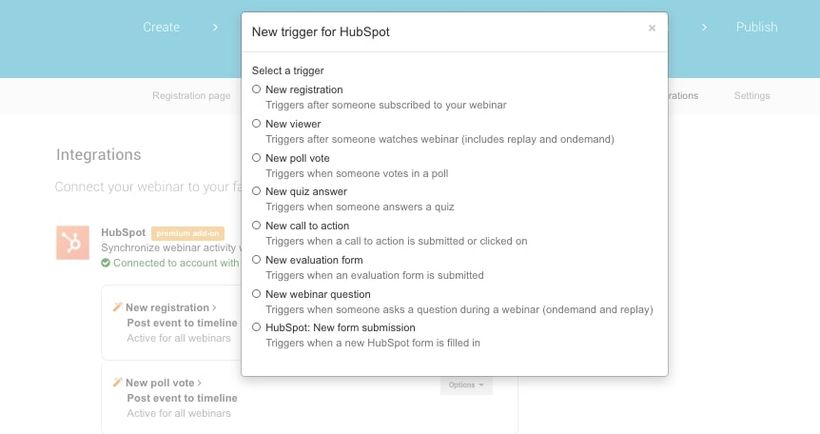
WebinarGeek offers the option to send data that is processed in your webinar to the Hubspot CRM system. And that’s handy when you want to follow up on leads. You can access information about participants directly in Hubspot, which enables you to easily segment the participants, based on, for example, the latest date on which your contact has watched a webinar. Then create a suiting email campaign and send the emails directly to the participants. Couldn’t be easier!
Besides participant data, Hubspot also receives information about viewer behavior, interactions, and evaluation forms. In this way, all your webinar participant data is stored in one place.
ActiveCampaign
Emails, such as the confirmation email and replay emails, can be sent outside of WebinarGeek. That’s where the ActiveCampaign integration comes into play. With this integration viewers, non-viewers and registrants are automatically added to your mailing list.
The benefit of this is that you can easily build email campaigns based on your participants’ viewing behavior. But of course, you can also send all WebinarGeek emails through ActiveCampaign. In the replay email, for example, the replay links are directly transferred to ActiveCampaign, so you don’t have to copy these yourself.
Facebook Pixel
Facebook Pixel makes remarketing, optimizing, and conversion tracking of your Facebook ads easy. The WebinarGeek integration helps you to easily make ads for your next webinar. It also offers the possibility to measure conversion from visitors to registrations for your webinar.
Setting up Facebook Pixel on your website can be quite challenging. Because we want to make it as simple as possible, you don’t have to worry about codes and settings. The link with WebinarGeek makes sure that Facebook Pixel is automatically shown on your public pages. All you have to do is set up the link. WebinarGeek does the rest.
Would you like to know which other integrations can be linked with WebinarGeek? Have a look at our Integrations page. Can’t find your tool on the list? Maybe you can use Zapier to link your integration to WebinarGeek.
Zapier
Zapier is a tool that lets you link thousands of other applications with WebinarGeek. Chances are that your favorite software can be found here as well. Would you like to add registrants directly to your mailing list, but do you not use ActiveCampaign or Mailchimp? Then search Zapier’s application list for your mailing system.
In chapter 4, we already talked about different payment tools besides Mollie. Through Zapier you can link tools such as PayPal or Stripe with WebinarGeek. In this way, you can organize a paid webinar using your favorite payment tool. Would you like to learn more about this? Have a look at our [English spoken webinar], in which we explain how to link integrations like Stripe and PayPal.
Linking WebinarGeek and Zapier is very easy. All you need are a Zapier account and a WebinarGeek account with available marketing integrations.
Integrations are also very easy to use, they can save you a lot of time and make sure that you can automate a big part of the registration process. Check which software you use and see how you can link this with WebinarGeek to take your registration process to a whole new level.
What have I learned?
What the benefits of integrations are in WebinarGeek
What I can do with WebinarGeek integrations
What I can do with Zapier
Next courses
Entdecke alle Webinar-Typen
Ein Live-Webinar ist am bekanntesten, aber es gibt noch viele weitere. Entdecke die Vorteile der verschiedenen Webinar-Arten.

Steigere die Vertriebseffektivität mit Revenuecoach
Entdecke die LinkedIn-Geheimnisse von Franck Fielemon von Revenuecoach.com in einer Q&A-Session.

Verbessere dein Audio mit OBS – Teil 1
Steigere die Klangqualität deines Webinars mit OBS! Teil 1 unseres Leitfadens zeigt dir, wie du dein Mikrofon optimierst, Hintergrundgeräusche reduzierst und effektive Filter anwendest.

Getting started with webinars
Better your skills to create more impact with webinars

Ein Webinar von A bis Z moderieren
Füge Moderatoren hinzu und verwalte den Live-Chat mit unserer Schritt-für-Schritt-Anleitung.

Interactions
Gather relevant information from viewers through the different interactions.

Zapier – Integriere mit 6.000+ Apps
Automatisiere Workflows, um Webinare effektiver und effizienter zu hosten.

3 Bewährte Webinar-Strategien
In diesem Video tauchen wir mit WebinarGeek in die Welt der Webinare ein und stellen dir drei erprobte Strategien vor, die garantiert zum Erfolg führen. Steigere jetzt deinen Erfolg!

Das 2025 Webinar Playbook für Coaches
Ein praktischer Leitfaden für Coaches, die wachsen wollen, ohne sich selbst zu verlieren. Dieses Playbook verzichtet auf leere Motivationsfloskeln und kommt direkt zur Sache: Wie nutzen echte Coaches Webinare, um mehr Menschen zu erreichen, Zeit zu sparen und trotzdem persönlich zu bleiben?

Wie man Webinare mit Streamlabs Desktop streamt
Lerne, wie du Webinare professionell mit Streamlabs Desktop einrichtest und streamst! In dieser ersten Folge führen wir dich durch die grundlegenden Schritte, um die Kunst des Webinar-Streamings zu meistern.