
Get more out of your on-demand strategy
Learning goal: make use the webinar channel for your on-demand strategy
Get more out of your on-demand webinars with your own webinar channel. With the webinar channel of WebinarGeek, you can show your webinars to your target group in a unique and simple way. Your webinar channel is a page where all your webinars are displayed in one list.
It is a fantastic way to promote on-demand and upcoming webinars. A unique place where you can display and announce them!
What is an on-demand webinar?
With an on-demand webinar you can give the viewer the option of watching the webinar at the time of their choosing. The viewer can also pause and rewind the webinar. They register in advance with name and email. You can see exactly at what time and by whom the webinar is watched. During the on-demand, the chat function and other interactive tools can be used. If someone uses the chat function, you will immediately receive it in your email and you can respond.
An on-demand webinar is very suitable if you want to continue generating leads after your live webinar. In addition, you continue to collect valuable statistics, allowing you to send highly targeted follow-up emails.
Place your channel on your own website!
Do you have a website or blog where you receive (many) visitors? Then place the embed code directly on your website. You just have to copy and paste the HTML code on to your website. The handy thing about this is that your visitors can see all your webinars in one overview.
The advantages:
Handy overview
More impact with on-demand webinars
You continue to generate leads
A platform for your webinars
On-demand webinar strategy
We know that an on-demand webinar is a great way to keep generating leads. The webinar channel is therefore amazing for keeping your on-demand webinar permanently on the radar. Add your on-demand webinars to your channel and offer an overview of all your content.
Advantages on-demand webinar strategy:
Not time-bound
You continue to collect emails
Respond directly to live questions
You continue to collect statistics & leads in the background
How do I create a webinar channel?
Creating a webinar channel is done with a few clicks. Go to the main menu and click "Channel". Then click on "Create your own channel".
Attention: for creating a webinar you need a premium account!
Generate more leads webinar channel
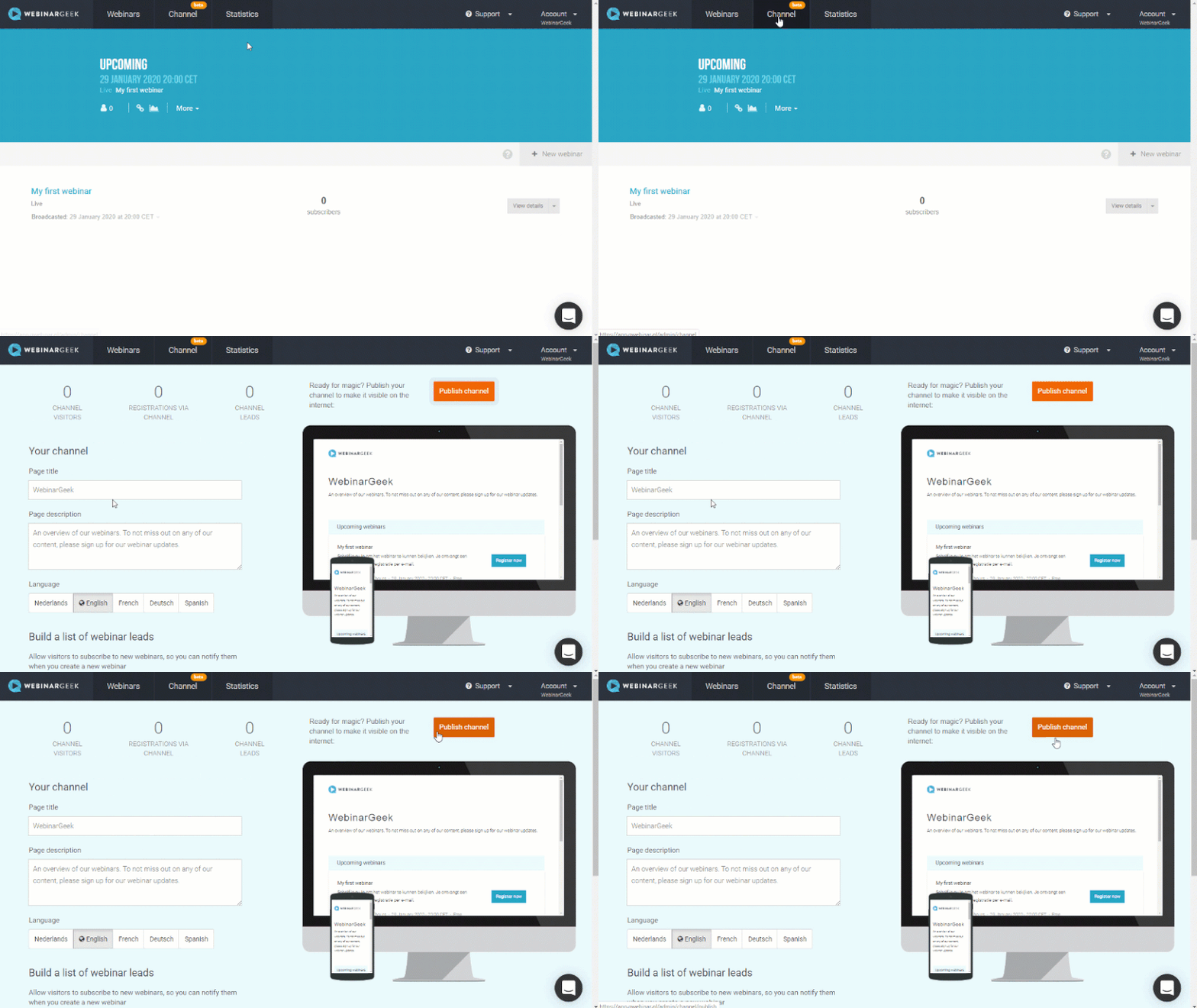
Visitors to your webinar channel have the option to sign up for future updates. As soon as you publish a webinar, they will automatically receive a reminder about this.
The webinar channel is easy to use and fully optimized for the Google search engines. Do you want to continue generating leads with on-demand webinars? Then use our webinar channel!
What did I learn?
What a webinar channel is
What an on-demand webinar is
How I can generate more leads with an on-demand webinar strategy
Prochains cours

How To Create Webinars That Sell
Want to create webinars that sell? In this video, we’ll show you how to craft engaging and high-converting webinars using WebinarGeek, whether they’re free or paid. Ready to get started?

Scale your lead generation funnel by WebinarGeek
WebinarGeek shares their expertise on using the power of webinars for lead generation.

Email template trends by Unlayer
Attract more subscribers with the email editor and page builder, powered by AI.

Improve your audio using OBS - part 2
Enhance your webinar audio with OBS filters! In Part 2, explore advanced effects like compressor, expander, limiter, EQ, and more for exceptional sound quality. Tune in and level up your webinars!

Create a Live Webinar
Take your live webinars to the next level with our step-by-step checklist!

5 Best Ways To Find New Webinar Topics
Struggling to find fresh and engaging webinar topics? Look no further! In this video, we dive into the top 5 strategies to spark your creativity and uncover compelling subjects for your next webinar.
Use AI to create your webinars
Discover the future of webinars! With AI you can create a webinar in minutes—from outline to presentation, recording, and promotion. Say goodbye to hours of preparation and hello to seamless, efficient webinars.

How to stream webinars with vMix part 2
Continue your Phoenix journey! In part 2 of our series, we dive into adding videos, display captures, and mastering transitions. Join us to elevate your streaming game with vMix.
Create a webinar for online training
Engage, challenge, and assess your viewers with these features

Optimize your webcam with OBS - part 1
Enhance your webinar's visual appeal! Learn to optimize your webcam image using OBS. Brightness, contrast, saturation, sharpness—master these settings for a captivating presentation.