
Get more out of your on-demand strategy

Learning goal: make use the webinar channel for your on-demand strategy
Get more out of your on-demand webinars with your own webinar channel. With the webinar channel of WebinarGeek, you can show your webinars to your target group in a unique and simple way. Your webinar channel is a page where all your webinars are displayed in one list.
It is a fantastic way to promote on-demand and upcoming webinars. A unique place where you can display and announce them!
What is an on-demand webinar?
With an on-demand webinar you can give the viewer the option of watching the webinar at the time of their choosing. The viewer can also pause and rewind the webinar. They register in advance with name and email. You can see exactly at what time and by whom the webinar is watched. During the on-demand, the chat function and other interactive tools can be used. If someone uses the chat function, you will immediately receive it in your email and you can respond.
An on-demand webinar is very suitable if you want to continue generating leads after your live webinar. In addition, you continue to collect valuable statistics, allowing you to send highly targeted follow-up emails.
Place your channel on your own website!
Do you have a website or blog where you receive (many) visitors? Then place the embed code directly on your website. You just have to copy and paste the HTML code on to your website. The handy thing about this is that your visitors can see all your webinars in one overview.
The advantages:
Handy overview
More impact with on-demand webinars
You continue to generate leads
A platform for your webinars
On-demand webinar strategy
We know that an on-demand webinar is a great way to keep generating leads. The webinar channel is therefore amazing for keeping your on-demand webinar permanently on the radar. Add your on-demand webinars to your channel and offer an overview of all your content.
Advantages on-demand webinar strategy:
Not time-bound
You continue to collect emails
Respond directly to live questions
You continue to collect statistics & leads in the background
How do I create a webinar channel?
Creating a webinar channel is done with a few clicks. Go to the main menu and click "Channel". Then click on "Create your own channel".
Attention: for creating a webinar you need a premium account!
Generate more leads webinar channel
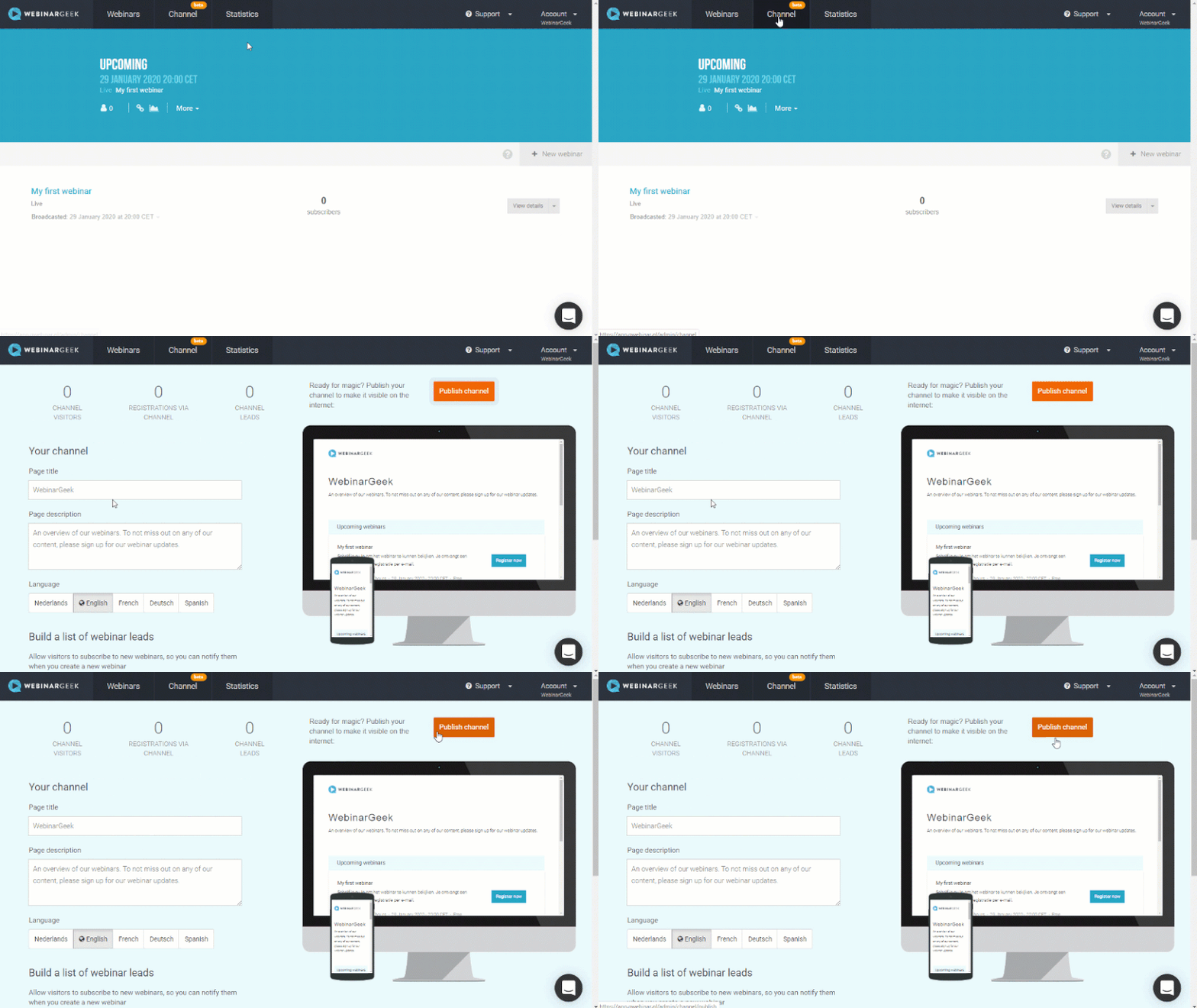
Visitors to your webinar channel have the option to sign up for future updates. As soon as you publish a webinar, they will automatically receive a reminder about this.
The webinar channel is easy to use and fully optimized for the Google search engines. Do you want to continue generating leads with on-demand webinars? Then use our webinar channel!
What did I learn?
What a webinar channel is
What an on-demand webinar is
How I can generate more leads with an on-demand webinar strategy
Nächste Kurse

Interactions
Gather relevant information from viewers through the different interactions.

Mach dich bereit, live zu gehen
Mit unserer Checkliste für die letzten Vorbereitungen
5 Tipps für deine vorab aufgezeichneten Webinare
Mach deine vorab aufgezeichneten Webinare spannender und professioneller, indem du deine Präsentation optimierst, verschiedene Formate berücksichtigst und eine ablenkungsfreie Erfahrung sicherstellst.

3 Bewährte Webinar-Strategien
In diesem Video tauchen wir mit WebinarGeek in die Welt der Webinare ein und stellen dir drei erprobte Strategien vor, die garantiert zum Erfolg führen. Steigere jetzt deinen Erfolg!

3 Bewährte Webinar-Strategien
In diesem Video tauchen wir mit WebinarGeek in die Welt der Webinare ein und stellen dir drei erprobte Strategien vor, die garantiert zum Erfolg führen. Steigere jetzt deinen Erfolg!
Erstelle ein Webinar für deine Kommunikation
Binde deine Zuschauer ein, fordere sie heraus und miss die Wirkung: mit diesen Funktionen

Wie du dein Webinar auf Social Media bewerben kannst
In diesem Video zeigen wir dir unsere besten Tipps und Tricks, um dein Webinar auf Social Media zu bewerben. Von der besten Plattform für dich bis zur effektiven Nutzung eines Call-to-Actions!

E-Mail- und Webinar-Marketing durch MailBlue
MailBlue, offizieller ActiveCampaign-Reseller, zeigt, wie Webinare und E-Mail-Marketing zusammenpassen.

Erstelle einen Content-Kalender mit Intercom
Intercoms Transformation von keinem Content-Kalender zu einer vollständigen Strategie und einem durchdachten Content-Kalender.
Organisiere epische Webinare mit RTMP
Upgrade dein Webinar-Erlebnis! Lerne, wie du OBS, den Atem Mini Pro und RTMP nutzt, um die beste Qualität zu erzielen.