
What to do after your webinar?

Learning goal: being successful after your webinar
If you want to get the max out of your webinar and really get results, you are just getting started! It is really important that you do the right things after your webinar and give follow up to your hot leads. So no time yet to lean back and relax and just wait for the customers to come to you.
In this course, we’ll discuss how to analyze the statistics and your viewers' behavior. After we’ve done that, we’ll show you how you can use these statistics to give follow up to the right leads at the right time. Finally, we will tell you how you can use your webinar longer to get even more results.
The webinar dashboard
After you’ve published your webinar, you will get to the webinar dashboard. The webinar dashboard gives you the most important data about your webinar at a glance. You can also access the dashboard by clicking “view details” of your webinar on the list of all your webinars.
The statistics
WebinarGeek makes sure that all the feedback on your statistics is collected in one simple place, the statistics page. The statistics page tells you a lot. Here you can see for example:
How many viewers have watched your webinar
How long a viewer has watched your webinar
When they left
At what time the users on average have logged on to watch the webinar
To dive even deeper into the engagement of your viewers, you can use these graphics. It shows you exactly how many viewers were watching your webinar from minute to minute. With these graphics, you can easily see exactly at which point your viewers left the webinar. If you see a sudden drop in viewer numbers, you can ask yourself if it’s maybe a good idea to change your presentation a little bit to keep everybody’s attention.
Statistics and interactions
Furthermore, you will get to see the number of reactions to your interactions. To get an overview of a specific interaction you can click on “check results” on the page behind your interaction.
What can you do with the statistics? It’s useful information that you received from your target audience. With this information, you can fulfill the wishes and needs of your target audience. That’s incredibly valuable because you can use this information to make sure your product or service is placed on the market optimally for their wishes and needs.
Follow-up mails
The statistics and collected email addresses give you a great opportunity to send customer-specific follow-up mails. For example, you can give a one time and unique offer to the viewers of your webinar. On top of that ‘hot leads’ are a lot different than ‘cold leads’. There is no time window, you can keep targeting them until you get a ‘yes’ or a ‘no’.
With ‘hot leads’ there are a few things you should keep in mind with your follow-up emails. The two most important things to keep in mind with ‘hot leads’ are:
Frequence
Relevance
You want to be persuasive but without being annoying and you want your emails to be as simple as possible, but still be relevant.
You can use this next set up for your follow-up emails:
Day 1: first follow-up
Day 3: second follow-up
Day 7: third follow-up
Day 14: forth follow-up
Day 28: fifth follow-up
Day 58: sixth follow-up
From day 58 on you can send a follow-up email every month.
A follow-up doesn’t have to be complicated. If they give you a ‘no’, often they have a good reason for that. It’s your task to keep your company on top of their mind and keep remembering them how relevant you are for them, without being pushy or annoying.
In one of our next courses, we’ll dive deeper into the follow-up mail. How you write the perfect follow-up mail and exactly what to keep in mind.
Keep generating leads
Make your webinar available on-demand to keep generating ‘hot leads’. Make it available for all potential customers. For example, you can send an email with the link to the on-demand webinar to all subscribers who didn’t watch the webinar live.
When the viewer watches the on-demand webinar, all of your interactions will be copied from the original, live webinar. At exactly the same moment as you activated a poll during your live webinar, the poll will be activated in the on-demand webinar and viewers can respond in real-time. When a viewer asks a question during the on-demand webinar, the question will be forwarded to your email instantly so you can respond to them quickly. In this way, you keep collecting the statistics and valuable leads.
One of the benefits of making a recording of your webinar available on-demand is that it happens behind a registration page. To watch the webinar, a person has to register first. This means you know exactly who watched your webinar.
The benefits of making a webinar available on-demand:
It’s almost the same experience as watching the webinar live.
The viewer can watch the webinar at the moment that’s most convenient for them.
You can give them the possibility to rewind or fast-forward the webinar.
They can ask questions by chat.
If you used interactions, like polls, they can still answer the questions.
Place your (on-demand) webinar on your own channel!
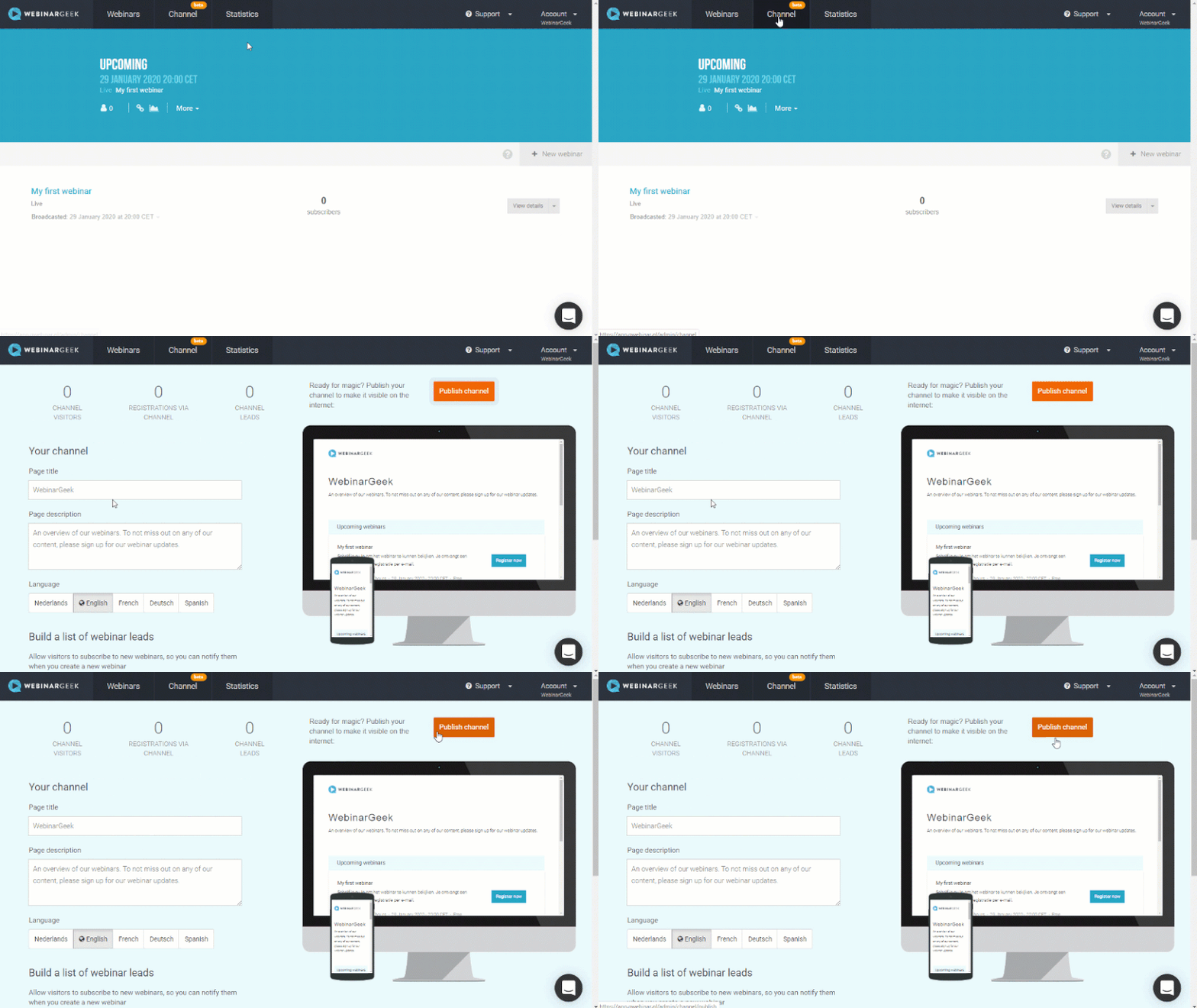
At WebinarGeek we provide the webinar channel for our customers. This is a place where you can easily announce future webinars and webinars on-demand. The channel gives you a clear page that shows a complete overview of all your webinars.
A webinar can keep being valuable for you and your company by making it available regularly or permanently for potential viewers. Besides that, you can use the statistics of your webinar to make your next broadcast even more interesting!
What have I learned?
What the webinar dashboard is
How I generate more valuable leads after my webinar
Next courses

How to host a webinar together
Work together with your own colleagues or with a partner

Der ultimative Kamera-Switcher: Atem Mini
Entdecke, wie der Atem Mini, ein vielseitiger Kamera-Switcher, deine Webinare mit seiner benutzerfreundlichen Oberfläche, mehreren Eingangsoptionen und professionellen Funktionen revolutionieren kann. Perfekt für alle, die ihr Livestream-Setup verbessern möchten.

Registration process from A to Z
Create a successful webinar by setting up the registration process in the right way

Einladen und Promoten
Veröffentliche dein Webinar, teile es mit der Welt und sammle wertvolle Daten über deine Teilnehmer!

Verbessere deine Webinar-Skills
Verbessere deine Webinar-Skills, generiere mehr Leads und steigere deinen Umsatz.
Akademie: KI x Webinare
Explore how to use AI to create content for your webinars.

Akademie: HubSpot + Webinare
Ein Leitfaden für Teams, die ihren Webinar-Workflow in HubSpot reibungsloser gestalten möchten. Ohne Theorie, dafür mit klaren Schritten, um Daten synchron zu halten, nach Teilnehmerverhalten zu segmentieren und Follow-ups zu einem wiederholbaren Prozess zu machen.

Live-Webinar erstellen
Erstelle schnell und einfach ein Webinar mit dem praktischen Webinar-Wizard!
Dry runs - Essential for successful webinars
Preparation is key for every marketer. Well begun is half done.

Restream – Streame auf mehrere Kanäle
Entdecke, wie Restream und WebinarGeek zusammenarbeiten, damit du dein Webinar gleichzeitig auf mehr als 30 Kanälen übertragen kannst.