WebinarGeek vs ClickMeeting
More branding control, smoother webinar workflows, and support that’s there when you need it.
Over 5,000 companies in more than 55 countries trust WebinarGeek
















Why are teams switching to WebinarGeek?

Keep branding consistent across every webinar

Host successful webinars with AI and learn what works
Run repeatable webinars without redoing everything

Get the best-rated support in the industry

Say goodbye to complex and limiting webinar hosting
ClickMeeting gets the job done. WebinarGeek makes it easier to run webinars that look professional, stay consistent, and feel simple to manage every time.
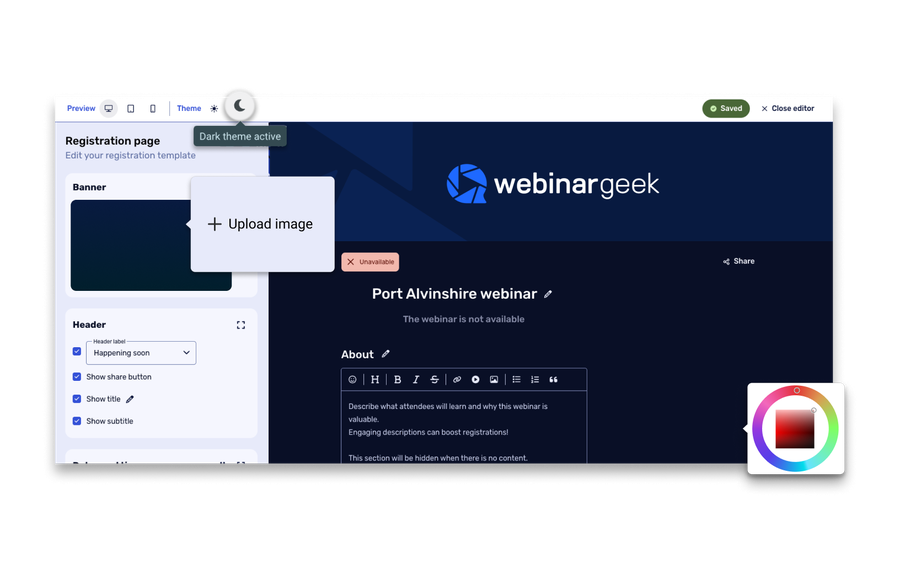
Here's a quick summary of how we differ from ClickMeeting:
More control over branding and the look of your webinar journey
Easier setup and smoother day-to-day use
Better-rated support and stronger customer satisfaction
A more polished workflow for registration, hosting, and follow-up
Better perceived value for money according to comparison review data
Ready for the specifics? See how WebinarGeek compares to ClickMeeting below.
View nowSee what users are saying
Don’t just take our word for it, see what our users say about WebinarGeek.
Sounds great but I have some doubts...
Totally fair. Here are the questions we hear most from people comparing WebinarGeek and Livestorm.

Is WebinarGeek a good alternative to ClickMeeting?
Yes, especially for teams that want webinar software that feels easier to manage from start to finish. WebinarGeek stands out with a smoother setup experience, simpler day-to-day admin, stronger support, and a workflow that feels more polished across registration, hosting, and follow-up.

Which platform is easier to use day to day?
WebinarGeek. It tends to feel simpler for the people actually running webinars every week. ClickMeeting covers a lot, but some parts of the platform can feel less intuitive, and more advanced settings often take a bit more digging and getting used to.

Which platform is better for branded, repeatable webinars?
WebinarGeek is the stronger fit for marketing teams that want webinars to look and feel more aligned with their brand. ClickMeeting lets you add the basics, like a logo and colors, but offers less room to shape the experience in a more customized way.

What if we need help right before going live?
That’s one of the clearest reasons teams lean toward WebinarGeek. When a webinar is about to start, fast and reliable support matters more than an extra feature on paper. WebinarGeek stands out here, which makes it a safer choice for teams that run important live sessions and want more confidence on the day itself.
Is WebinarGeek a good alternative to ClickMeeting?
Yes, especially for teams that want webinar software that feels easier to manage from start to finish. WebinarGeek stands out with a smoother setup experience, simpler day-to-day admin, stronger support, and a workflow that feels more polished across registration, hosting, and follow-up.
Which platform is easier to use day to day?
WebinarGeek. It tends to feel simpler for the people actually running webinars every week. ClickMeeting covers a lot, but some parts of the platform can feel less intuitive, and more advanced settings often take a bit more digging and getting used to.
Which platform is better for branded, repeatable webinars?
WebinarGeek is the stronger fit for marketing teams that want webinars to look and feel more aligned with their brand. ClickMeeting lets you add the basics, like a logo and colors, but offers less room to shape the experience in a more customized way.
What if we need help right before going live?
That’s one of the clearest reasons teams lean toward WebinarGeek. When a webinar is about to start, fast and reliable support matters more than an extra feature on paper. WebinarGeek stands out here, which makes it a safer choice for teams that run important live sessions and want more confidence on the day itself.
WebinarGeek is the best alternative for Clickmeeting
Do you want to know why WebinarGeek is the better webinar platform? Compare Clickmeeting vs WebinarGeek (2026).

VS
Clickmeeting
Clickmeeting
Vimeo
General options
Advanced options
Tool/interaction
Integration
Support
Last updated: 2026

11,000 Sign-Ups: The Webinar Success of Nies Cools
Nies Cools, a Belgian business coach, turned to webinars to scale her coaching practice without losing the personal touch. What started with 120 sign-ups grew to over 11,000 registrations for a single session.
Read moreFAQ
What is the difference between ClickMeeting and WebinarGeek?
The main difference between ClickMeeting and WebinarGeek is how the platforms feel in day-to-day use. ClickMeeting is often seen as the more feature-heavy option, while WebinarGeek stands out for ease of use, smoother setup, stronger support, and a more polished webinar workflow. For teams that want webinar software that feels simple, professional, and easy to repeat, WebinarGeek is often the better fit.
Is WebinarGeek a good alternative to ClickMeeting?
Yes, WebinarGeek is a strong ClickMeeting alternative for businesses that want less friction when running webinars. It’s a good fit for teams that care about usability, branded webinar experiences, dependable support, and a setup that feels easier to manage across registration, hosting, and follow-up.
Is WebinarGeek GDPR compliant?
Yes. WebinarGeek is designed with GDPR compliance in mind and stores data on European servers.
For companies in Europe, this can be an important factor when collecting attendee data through a registration page or sending automated emails related to the webinar.
Which is easier to use: ClickMeeting or WebinarGeek?
WebinarGeek is generally the easier webinar platform to use. It’s better suited to teams that want to get started quickly, manage webinars without extra complexity, and avoid digging through settings to find what they need. ClickMeeting can do a lot, but it tends to feel less intuitive once you move beyond the basics.
Which platform is better for branded webinars and support?
WebinarGeek is the stronger choice if branded webinars and reliable support are high on your list. ClickMeeting covers the basics but offers less flexibility when it comes to shaping the webinar experience around your brand. WebinarGeek also stands out more clearly when it comes to support, which matters most when you’re running live sessions that need to go smoothly.
How do I make the switch?
Ready to move over? Start your free trial or talk to us if you're bringing a bigger team or need something custom.